Descript features
Descript is an AI video and audio editor that lets you record, transcribe, edit, refine, share, and repurpose video by editing text. Underlord, the AI co-editor, can do most of the work for you.
01
Turn the camera on and record yourself, your screen, or remotely record another guest. You can also just bring in existing footage. Either way, Descript transcribes it in seconds and you're off to editing.
Start recording free
4K multitrack recording with guests anywhere in Rooms

Record your screen and camera, then edit the transcript.

Start from a proven prompt and just go

Drop in video, audio, or a even Zoom recording

Draft a script from a prompt, or tighten the one you’ve written

Create video, images and audio from a prompt
02
Edit your words to edit your video. Then cut filler words and retakes in a click. The timeline is only there if you want it.
Try text-based editing
Like editing a doc, delete or move words to make edits

Automatic transcripts for audio and video in dozens of languages

Tell it what you want and let Underlord take the drudgery

Ums, uhs, and long pauses gone in one pass

Keep the good takes and quickly cut the rest

Fix flubbed lines by typing the correction
03
However you started, turn your footage into polished video and audio. Fix bad audio, remove the background, or apply eye-catching layouts.
Clean up a recording
Remove background noise and enhance your voice

Add portrait lighting to fix badly lit footage

Correct your gaze toward the camera

Swap or remove the background without a green screen

Add scenes, layouts, and B-roll from stock or generate your own

Comment and edit together in one project
04
Video is meant to be shared. Take your video from Descript directly to the places it will have an impact.
Publish your first video
Styled, editable captions in one click, synced to your transcript

Every format and resolution, plus direct publish

Generated from the transcript, keywords included

Named chapter markers, inserted automatically

Written for you from what was actually said
05
Your video can do more for you. Turn one video into dozens through clipping, translation, and automation.
Make your first clip
Find the best moments and reformat for every platform

Dub and subtitle into dozens of languages

Draft promo copy for every platform or generate YouTube thumbnails

The end-to-end podcast workflow, audio or video
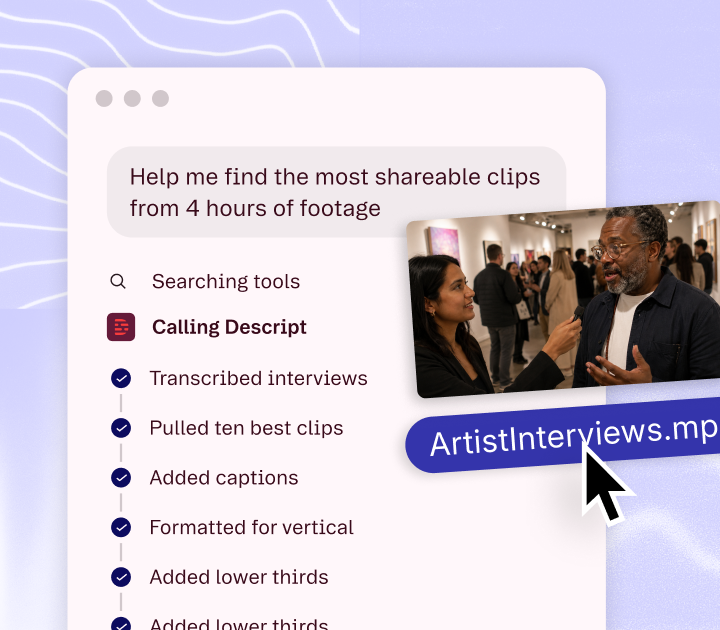
Underlord is Descript's AI co-editor that turns a raw recording into an edited video from a text instruction. It can cut filler, pick the best takes, add scenes, and generate clips, and you can review or undo every change.
Text-based editing lets you edit video and audio by editing the transcript. Deleting a word removes that moment of media; moving a sentence moves the footage with it.
Studio Sound is an AI audio filter that removes background noise and echo and enhances the speaking voice. It applies in one click to any track.
Descript MCP is a connector that lets AI agents such as Claude operate Descript to transcribe, edit, and create clips. It runs on the same API available to developers.
Rooms is Descript's remote recording studio, capturing up to 4K with a separate track per participant. Guests join from a browser link with nothing to install.
Screen recording captures your screen and camera together in one session. The recording lands in the editor already transcribed.
Transcription converts audio and video to accurate, timestamped text in dozens of languages. The transcript is the editing surface, not just an export.
Remove Filler Words finds and deletes ums, uhs, likes, and long pauses across a whole project in one pass. You can review each cut before applying it.
Remove Retakes detects repeated attempts at the same line and keeps the last good one. Record as many takes as you need and clean them up afterward.
Regenerate repairs damaged or mismatched audio by generating replacement speech that matches the surrounding tone. Video Regenerate does the same for picture, adjusting mouth movements to match a typed correction.
Eye Contact is an AI effect that redirects your gaze toward the camera when you were reading off-screen. It works on existing footage, no teleprompter required.
Green Screen removes or replaces the background behind a speaker without a physical green screen. Drop in any image or video instead.
Captions generates styled, editable subtitles from the transcript in one click. Style them to match your brand or burn them in on export.
Create Clips mines a long video or podcast for its strongest moments and reformats them for social platforms. Each clip stays editable in the project it came from.
Translation dubs and subtitles a video into dozens of languages from the original recording. The translated audio keeps the speaker's voice.
Templates are prebuilt layouts and workflows you start from instead of an empty timeline. Pick one, drop in your footage, and the structure is already there.
Integrations connect Descript to the tools around it — publish straight to YouTube, sync with Google Drive, or round-trip through Adobe.
Podcasting in Descript covers the full workflow — multitrack recording, text-based editing, audio repair, and publishing — for audio or video shows.
Import brings existing video, audio, or a Zoom recording into a project, transcribing it on arrival. There is no separate page for import; it is the first step of every other feature here.
Export writes your finished project to any common format and resolution, or publishes it directly to a connected platform.
Scenes and layouts arrange what is on screen at any moment — speaker framing, screen share, B-roll, and titles — without touching a timeline.
Collaboration lets several people comment on and edit the same project, with comments anchored to the moment in the video they refer to.
Which features are on which plan
Start for free and move up when you need more media hours, regularly use AI features, or need to export without a watermark.
$0
per person / month
1 person included
Start editing video by editing text


1 media hour / month

100 AI credits (one time)

Export 720p, with a watermark

Limited use of Underlord, our agentic video co-editor and AI tools

Limited trial of AI Speech
Most Popular
$16
per person / month
1 person included
Elevate your projects, watermark-free
10 media hours / month
400 AI credits / month
Export 1080p, watermark-free
Access to Underlord, our AI video co-editor

AI tools including Studio Sound, Remove Filler Words, Create Clips, and more
AI Speech with custom voice clones and video regenerate
$24
per person / month
Scale to a team of 3 (billed separately)
Unlock advanced AI-powered creativity
30 media hours / month
800 AI credits / month
Export 4k, watermark-free
Full access to Underlord, our AI video co-editor and 20+ more AI tools

Generate video with the latest AI models

Unlimited access to royalty-free stock media library

Access to top ups for more media hours and AI credits
$50
per person / month
Scale to a team of 5 (billed separately)
Empower collaboration on your team
40 media hours / month
1500 AI credits / month

Team-wide access to Brand Studio

Translate and dub video in 30+ languages with proofread

Generate custom avatars from photo upload or text
Priority support (with SLA)
Access to top ups for more media hours and AI credits
Descript records, transcribes, and edits video and audio by editing text. Core features include Underlord (the AI co-editor), Studio Sound, Eye Contact, Regenerate, captions, clips, translation, remote recording with Rooms, screen recording, and an API with MCP support.
Yes. Underlord is available on the free plan with a monthly allowance of AI actions. Paid plans raise the allowance.
Yes. The Descript API lets you automate transcription, editing, and clip creation, and the Descript MCP connector lets AI agents such as Claude do the same by conversation.
Yes. Rooms records up to 4K, separate tracks per participant, with guests joining from a browser link.
Features are the capabilities inside the Descript editor. Tools are single-purpose utilities you can use within a project, like the audio converter or the noise remover.
Start free, no credit card required. Or book a demo if you're evaluating for a team.